
In this guide
Before you start
You need three things. Tick them off as you get them ready.
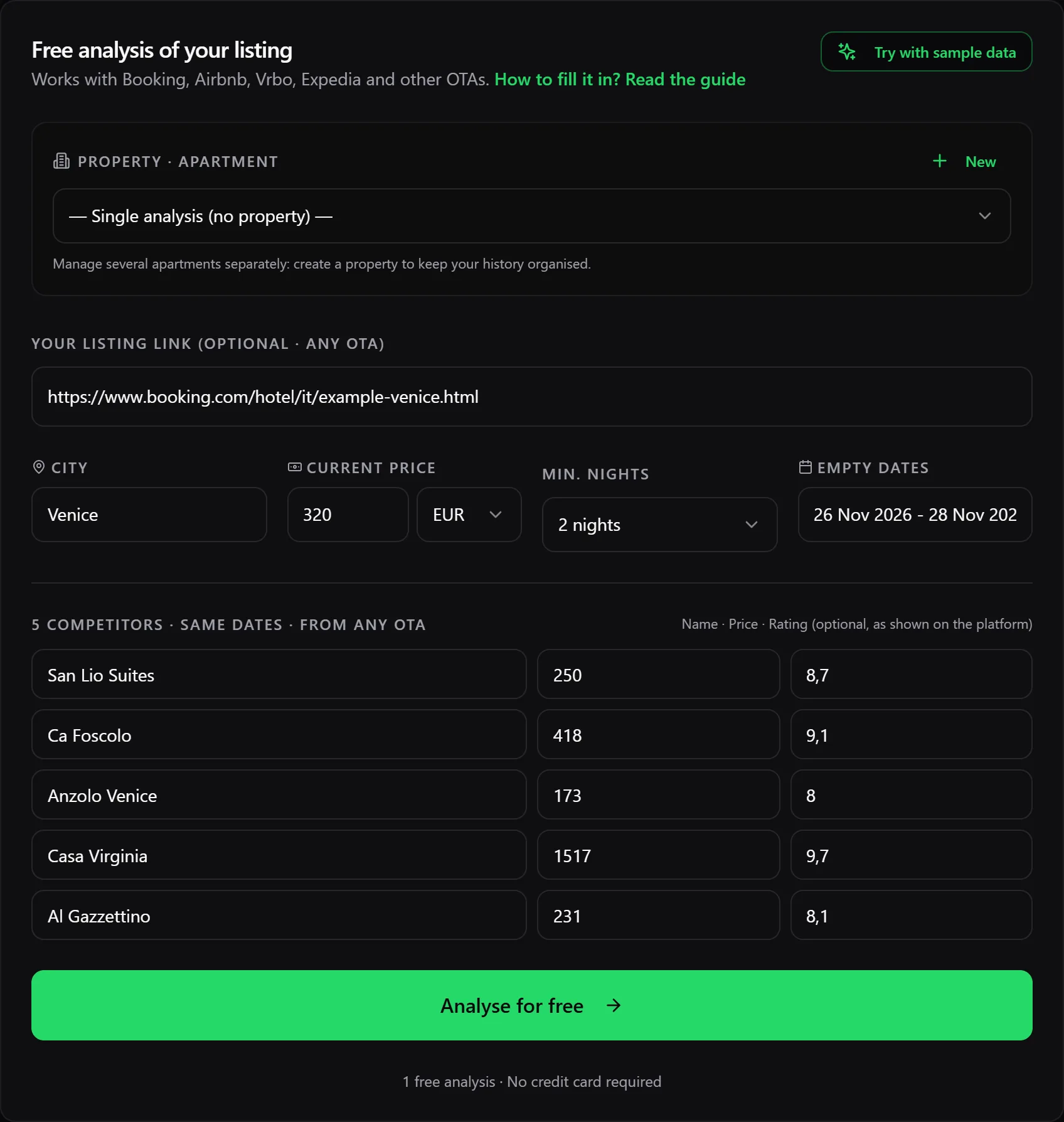
Just want to see how it works? In the app press “Try with sample data”: the form fills itself in with an apartment in Venice.
Your listing details
In the first part of the form you describe your place. Four fields are enough.
- City
- Where the place is. Any country works.
- Current price
- The nightly price guests see today for the empty dates.
- Min. nights
- The minimum stay you set on the platform.
- Empty period
- The dates to fill, written any way you like: “13-15 Nov” is fine.
- Link
- Optional, from any platform.
- Property
- If you manage several apartments, pick the right one: the analysis goes into its history.
Tip: Count your price the way you count your competitors’. The easiest way: search for your own listing on the platform with the same dates and take the total divided by the nights.
Choosing the right competitors
This is the most important step: the recommended price is only as good as the competitors you enter. A good competitor is a listing a guest could book instead of yours.
- Same area
- A few minutes’ walk away, not across town.
- Same type
- Apartments with apartments, not villas or hotel rooms.
- Same guests
- The same number of people you can host.
- Same dates
- The price for your empty dates, not another month’s.
Three is enough, five gives a more reliable result; you can add up to 20. If a price is more than three times above or below the others, the report marks it as an “outlier” and leaves it out of the calculation.
Try it: which would you pick?
This is an example: imagine your place is a one-bedroom flat for 4 in Rimini, Marina Centro, with 13-15 November still free.
The listings below are made up. Tap the ones you would use as competitors, then check.
Finding prices on Airbnb and Booking
Search your city with the dates of your empty period and the number of guests you host. Then, depending on the platform:
- The map is on the right: zoom into your area and the list shows the listings visible on the map.
- Use “Filters” and “Rooms and beds” to keep only places like yours, for example with the same number of bedrooms.
- Under each listing you see the price, for example “€129 total”: that is the price of the whole stay, fees included.
- Divide that total by the number of nights: that is the nightly price to enter.
- The rating is next to the star, for example “★ 4.79 (56)”: copy 4.79.
- In the filters on the left use “Neighbourhood” or “Distance from centre”, or open “Show on map”.
- Under “Property type” choose “Apartments” or “Entire homes & apartments”; under “Bedrooms and bathrooms” the number of bedrooms.
- The price is on the right of each property, under “2 nights, 2 adults”: it is the total for the stay, taxes and charges included.
- Divide that total by the number of nights: that is the nightly price to enter.
- The rating is in the blue box, for example “8.6”: copy it as it is.
Work out the nightly price
129
Tip: Write down name, price and rating as you scroll: copying them into the form then takes a minute.
Competitors’ ratings
The rating shows whether a competitor can charge more because guests like it more. It is optional: if a listing has no reviews, leave it empty.
Type it exactly as the platform shows it. Airbnb uses stars from 1 to 5, Booking scores from 1 to 10: Host Ghost recognises the scale by itself and puts everything out of 10.
Try it: type a rating
Airbnb stars: Host Ghost reads it as 9.6 out of 10.
Reading the report
The report arrives in about 15 seconds. Go through its four parts:
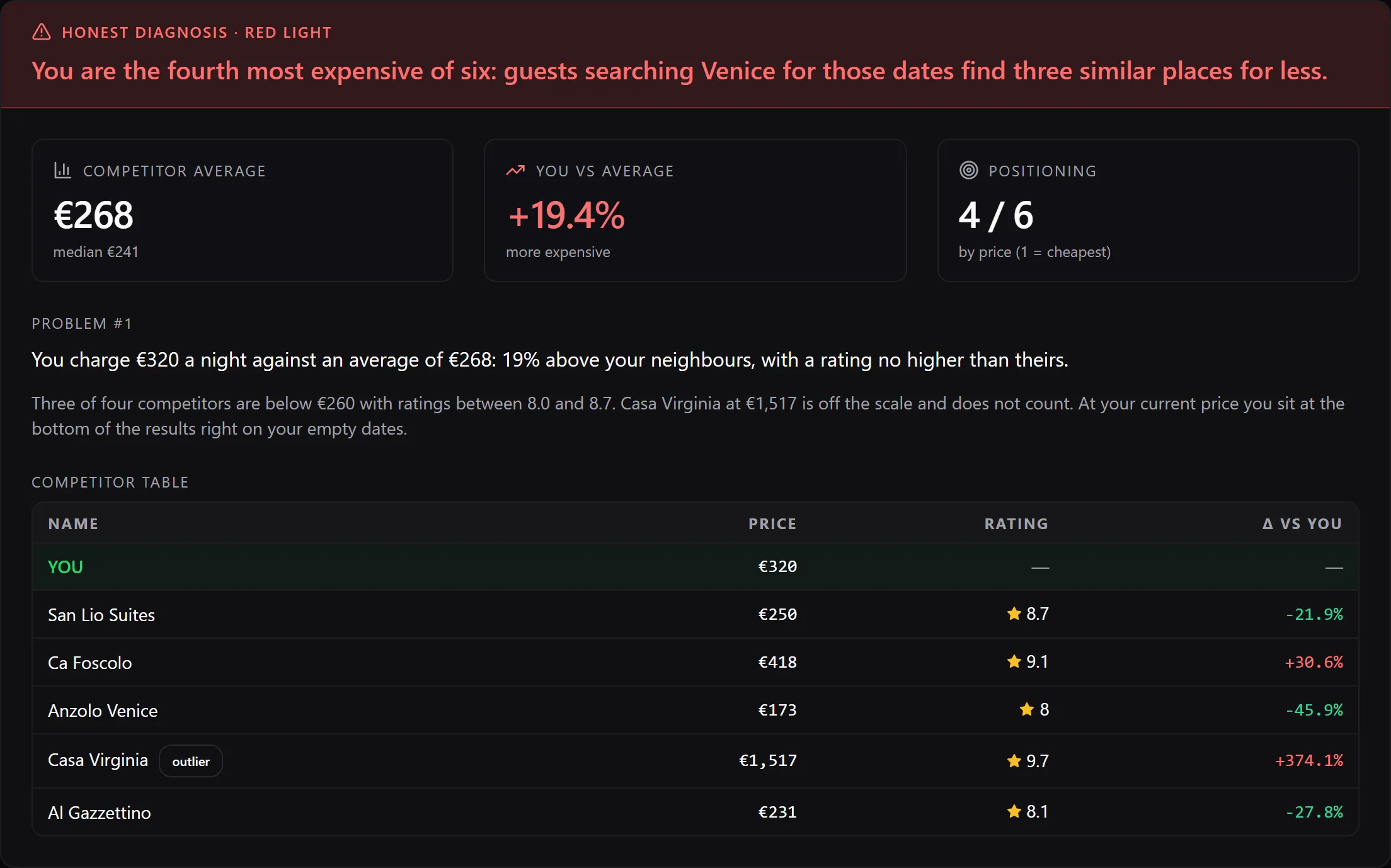
- The traffic light: red if the problem is serious, yellow if something needs fixing, green if you are in line with the market.
- Competitors’ average and median: the median is the price in the middle, the most reliable reference.
- You vs the average and your price ranking (1 = the cheapest).
- Problem #1 and the competitor table, with the outlier marked and left out of the calculation.
After your first analysis
Neighbours change their prices every week. It pays to run the analysis again:
- Every week
- For the dates in the next 30 days.
- Before peaks
- A bank holiday, a city event, high season.
- After a change
- When you have changed your price, to see where you now stand.
Your first analysis is free. With the Pro and Agency plans analyses are unlimited, you keep your history and manage several properties: up to 3 with Pro, up to 15 with Agency.
Pro and Agency also include the price radar: every Monday an email reminds you to update your neighbours’ prices and reopens your last analysis already filled in. You need to have confirmed your email to receive it.
Questions and problems
It says “Add at least 3 competitors”
Add at least three listings with name and price. The rating can stay empty.
It says “You have used your free analysis”
Create a free account and choose a plan to continue.
Can I mix competitors from Airbnb and Booking?
Yes, as long as the price is counted the same way for all: total stay price divided by the nights.
The recommended price looks odd
Check that the competitors are really similar to yours and the prices are for the same dates. A single wrong competitor moves the average.
The analysis stops with an error
Try again in a minute. If it keeps happening, write to us from the Contact page.
Ready to try?
Your first analysis is free and no card is needed.
Run your first analysis free